Transcription settings
Control how TellDone converts your voice to text and which language it recognizes.
Transcription modes
TellDone offers two ways to transcribe your voice:
Server transcription (recommended)
- More accurate for most languages
- Processed in the cloud
- Best choice for most users
Apple Speech Recognition
- Transcription happens on your device - it is not sent to a third-party speech service
- Audio is still uploaded to the server for playback and AI analysis
- May be less accurate for some languages compared to server transcription
To switch modes, go to Settings and toggle the Apple Speech Recognition option.
Your voice language
This is the most important setting in TellDone. It controls:
- How accurately your voice is transcribed
- The language used for note titles, summaries, tags, tasks, and events
- The language of your daily, weekly, monthly, and yearly report bodies
- The language of Smart Context responses
How to change it
- Go to Settings
- Scroll to Transcription language and tap the current language shown
- Search or scroll through 60+ supported languages, including German, French, Italian, Polish, Portuguese, Dutch, Japanese, Korean, Mandarin, Cantonese, Arabic, Hindi, Turkish, Vietnamese, Indonesian, Thai, Hebrew, Czech, Swedish, Norwegian, Finnish, Danish, Greek, Hungarian, Romanian, Bulgarian, Ukrainian, Croatian, Slovak, Slovenian, Estonian, Latvian, and Lithuanian
- Tap your language
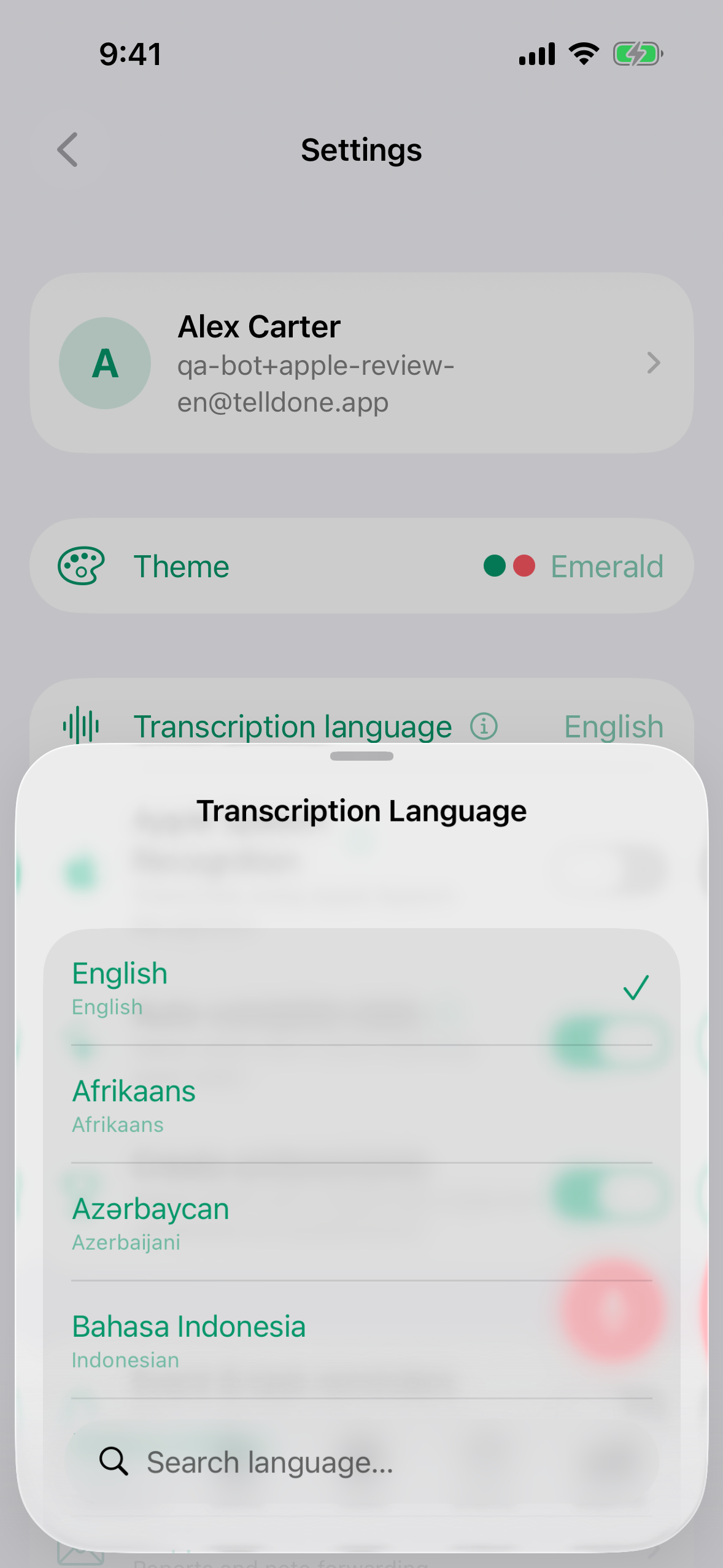
The change applies to your next recording. Existing notes keep the language they were created in.
App language vs voice language
These are two different settings now and they no longer share a single picker:
-
App language drives buttons, menus, the navigation bar, push notifications, email subject lines, inbox confirmation messages, and report section headings. It supports 20 languages: English, Spanish, Russian, German, French, Italian, Portuguese, Dutch, Polish, Slovak, Greek, Turkish, Japanese, Korean, Chinese, Croatian, Serbian, Bosnian, Slovenian, and Romanian. On iOS it follows your device language and is not configurable inside the app. On the web app, you can pick it directly in Settings > Voice & Language.
-
Voice / content language drives everything generated from your voice: titles, summaries, tasks, events, Smart Context replies, and the body of your reports. It supports 60+ languages.
A German speaker, for example, can keep the English UI and set the voice language to German. The interface stays in English while every summary, task, and report is written in German.
"My summaries used to come out in English"
If you used TellDone before this update and your summaries came out in English even though you spoke another language, go to Settings, tap Transcription language, and pick the language you actually speak. The current version cleanly separates the UI language (20 options) from the voice language (60+ options), so future recordings will be summarized in the right language.
Tips for best accuracy
- Choose one primary voice language and stick to it
- Don't mix languages in a single recording - this reduces quality
- You can change your voice language at any time - it applies to future recordings only
- Recordings under 2 seconds are filtered out, so speak for at least a few seconds