What is TellDone?
TellDone turns what you say into notes, tasks, and events.
How it works
- Record. Talk about anything: plans, ideas, meetings, things to do.
- TellDone transcribes and analyzes it. It understands 60 languages.
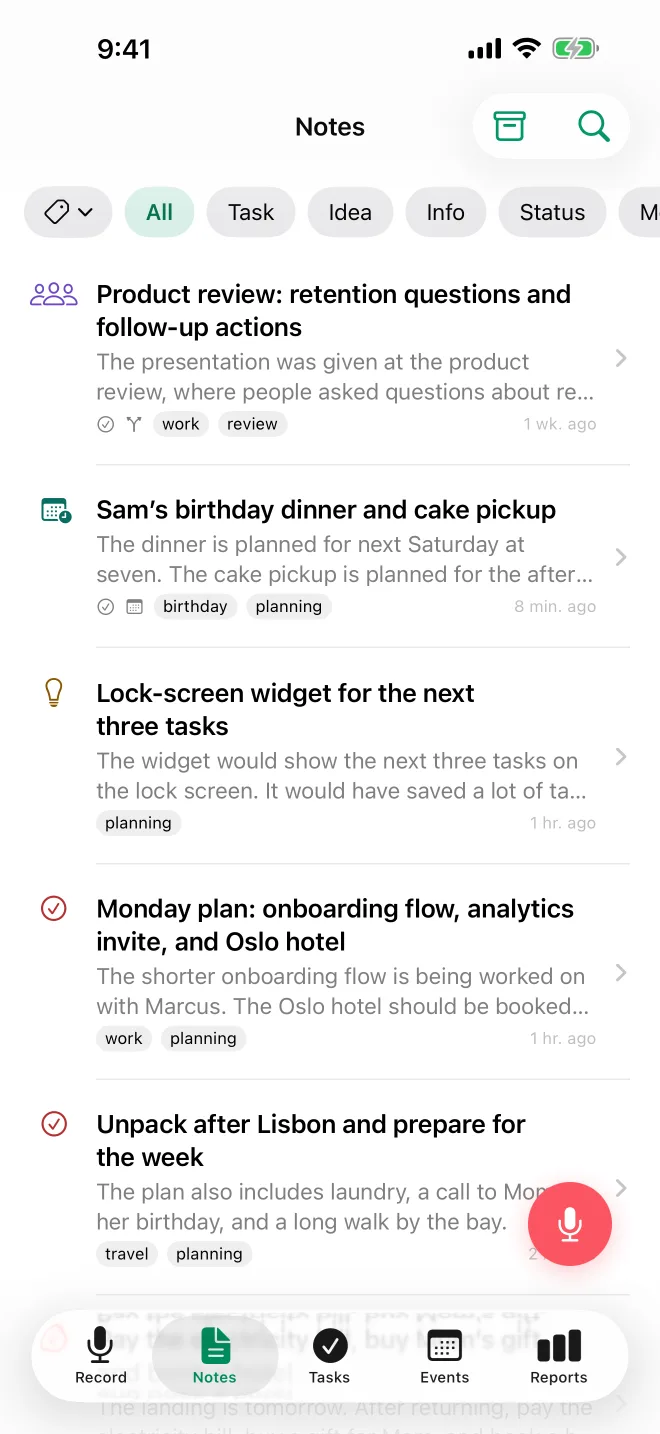
- You get a structured note. It has a title, a summary and tags, plus any tasks and events you mentioned.
What TellDone creates from your voice
- Notes with AI-generated titles and summaries, classified into 7 types:
- Task - something you need to do
- Idea - a thought worth saving
- Info - a fact, contact, address, or number
- Status - a report of what you've done
- Meeting - notes from a meeting or conversation that happened
- Reflection - thoughts, conclusions, observations
- Event - something planned for a specific date and time
- Tasks with priorities, deadlines, and reminders - extracted automatically
- Events with dates, times, and attendees - and added to Apple Calendar if you connect it
- Reports - daily, weekly, monthly and yearly summaries of what you got done. The monthly report also looks for signs of burnout. Daily reports are Basic and up; weekly, monthly and yearly reports are Pro and up.
Key features
- Voice recording with transcription in 60 languages
- Text input as an alternative to voice
- Smart Context (Basic and up) - TellDone auto-completes tasks when you mention finishing them, and tracks achievements even when you didn't create a task first
- Integrations on your iPhone: Apple Calendar and Apple Reminders on every plan, Google Tasks and automatic export to Apple Notes and Apple Journal on Basic and up (sending a single note there works on every plan), and Things 3 on Pro and up
- Integrations that sync from the server: Todoist, Notion, and Microsoft To Do (Basic and up; on Basic, one of them at a time), plus webhook automations (Basic and up) and email forwarding (Pro and up)
- AI assistants such as ChatGPT and Claude, connected through AI Agents (MCP): read-only on every plan, Read & Write on Pro and up
- Record offline: your recordings upload automatically when you're back online
tip
You can record two ways with the same button: tap to start and tap again to stop, or press and hold while you talk and let go to send.
Available on
- iPhone - the main app. Record from Control Center, the Lock Screen, the Action Button or widgets, or ask Siri to add a text note.
- Apple Watch - record voice notes from your wrist; they show up in the iPhone app
- Web - a web app at app.telldone.app to review your notes, tasks, events and reports. See TellDone on the web
Plans
TellDone offers four plans: Free, Basic, Pro, and Ultra. Start for free and upgrade as you need more. See Plans and Pricing for a full comparison.
Every new account also gets a Pro gift. Your first voice recording unlocks 30 days of Pro (37 if that recording falls in the last 8 days of the month, UTC), then you're back on Free automatically. No subscription, nothing charged.
Get started
Here is the quickest path:
- Download and install TellDone on your iPhone
- Create your account
- Record your first voice note and see what TellDone makes of it
- Explore the interface to find your notes, tasks, and events
Or jump straight to a feature guide: