MCP Access (AI agents)
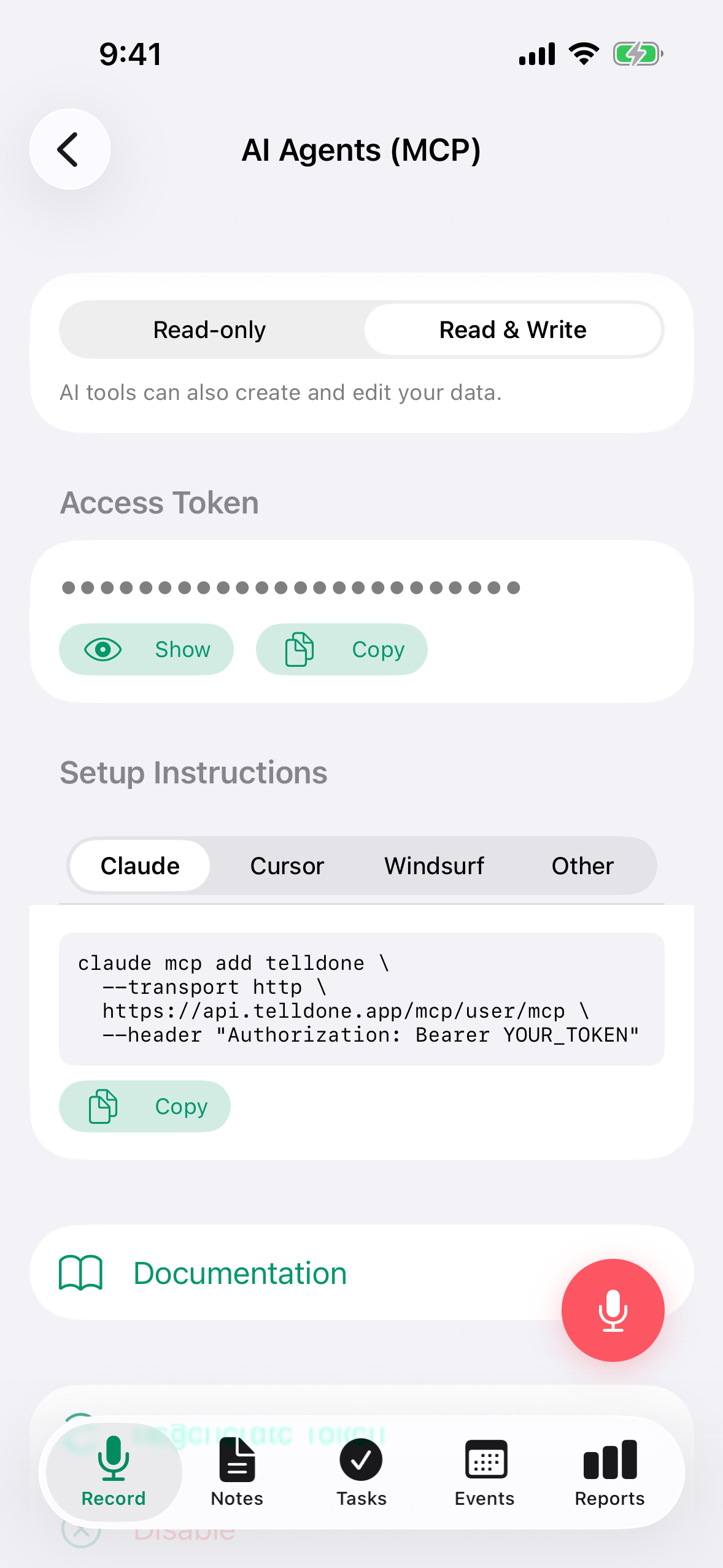
MCP is now fully available on iPhone (in addition to the web app). The iPhone screen mirrors the web one and includes the same setup snippets for all supported AI clients.
MCP Access requires a Pro or Ultra plan. Both plans get full read + write access (27 tools) and can toggle to read-only mode if you prefer.
MCP (Model Context Protocol) lets you connect AI coding assistants and automation tools directly to your TellDone data. Once connected, your AI agent can read your notes, tasks, events, reports, tags, and change history - and create, update, delete, and restore items. There are 27 tools total: 10 for reading data and 17 for writing.
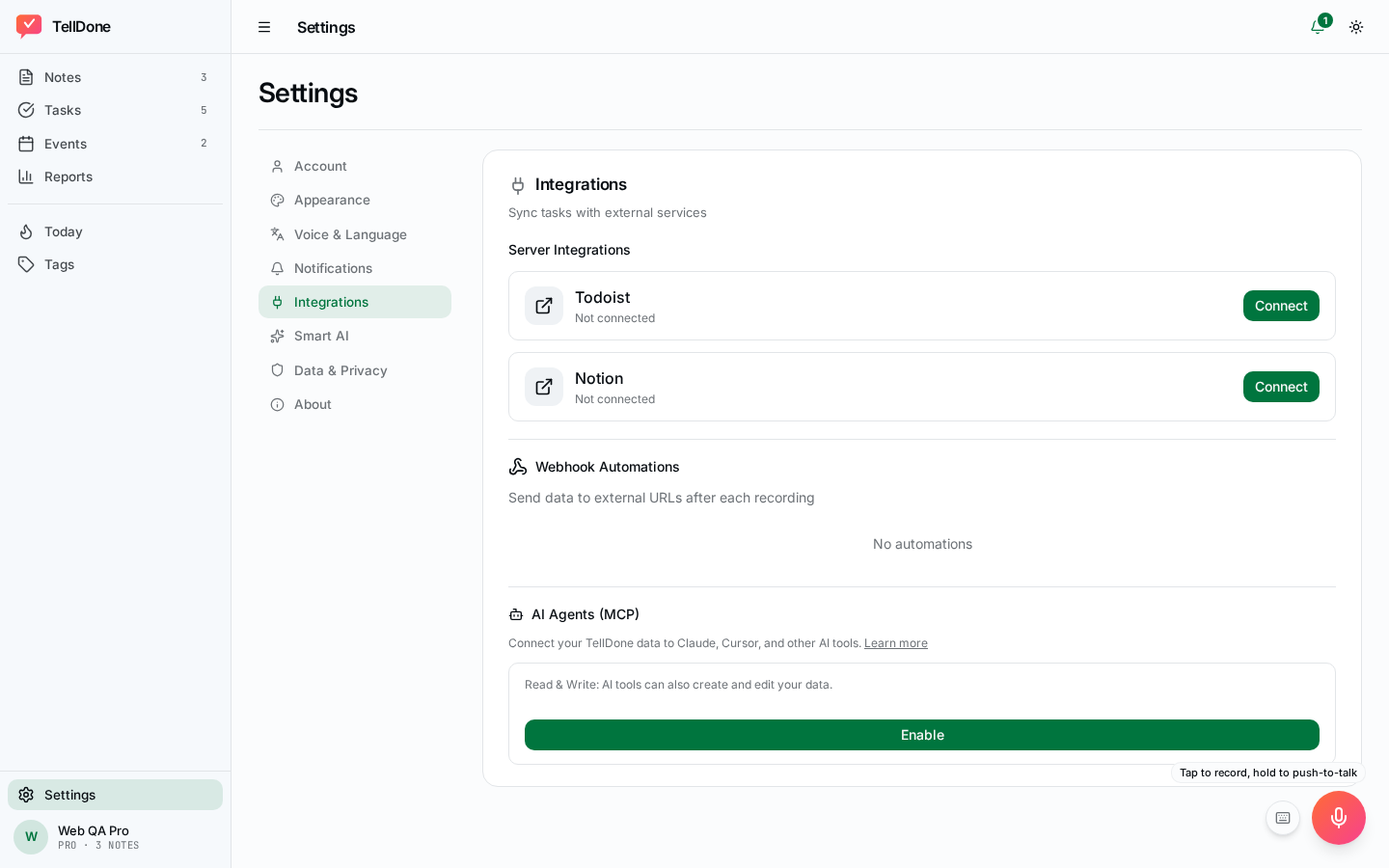
Available in both the iPhone app (Settings → Integrations → AI Agents) and the web app (Settings → AI Agents).
On the iPhone, Settings → Integrations → AI Agents opens the MCP setup screen with your access token masked by default:
And on the web:
Two ways to connect
There are two ways to authenticate an AI client, and both are fully supported:
- OAuth 2.1 (recommended) - the standard "Sign in with TellDone" consent flow. This is what Claude Desktop's connector UI and Claude.ai use. No copying tokens - you sign in with your TellDone account and approve the permissions the client is asking for.
- Bearer token - copy your personal access token from Settings and paste it into your client's config. Simplest for scripts, CLIs, and clients that don't have a built-in OAuth flow.
| Client | Recommended |
|---|---|
| Claude Desktop / Cowork | OAuth - add a custom connector with the MCP URL, then sign in |
| Claude Code (CLI) | Either - claude mcp add walks you through OAuth in your browser, or add a Bearer header for the token method |
| Scripts or your own code | Bearer token - simplest to automate |
| A client that only supports picking from a directory of listed connectors | Use the bearer-token or mcp-remote bridge for now - TellDone isn't in any connector directory yet |
Plan requirements
| Plan | MCP |
|---|---|
| Free | Locked |
| Basic | Locked |
| Pro | Read + Write (27 tools) - can toggle to Read-only mode |
| Ultra | Read + Write (27 tools) - can toggle to Read-only mode |
The in-app screen
The AI Agents screen has three states depending on your plan and whether MCP is turned on.
Locked (Free and Basic)
If you are on the Free or Basic plan, the screen explains what MCP does and shows an Upgrade button. Tapping it opens the paywall where you can move to Pro or Ultra.
Disabled (Pro and Ultra, feature off)
If you are on Pro or Ultra but have not turned MCP on yet, the screen shows a short summary of what your plan can do (number of tools, access mode, quotas) and an Enable button. Tap it to generate your connection token and start the integration.
Enabled
Once enabled, the screen shows everything you need to connect an AI client:
- Mode toggle - switch between Read-only and Read + Write at any time, on both Pro and Ultra.
- Access Token row with an eye toggle to reveal or hide the token and a copy button.
- Setup picker with tabs for Claude Code, Cursor, Windsurf, and Other. The matching code snippet appears below the tabs - just copy and paste it into your AI client.
- Regenerate button - rotates the token immediately and disconnects any active sessions using the old one.
- Disable button - turns MCP off and deletes the token. You can re-enable later, but a new token will be issued.
Keep your connection token private. Anyone with the token can access your TellDone data. Use Regenerate if you ever suspect the token has leaked.
How to enable
You can configure MCP from either platform:
- iPhone: Settings → Integrations → AI Agents (MCP)
- Web: app.telldone.app → Settings → AI Agents
Steps:
- Tap Enable.
- Choose your access mode (Read-only or Read + Write - available on both Pro and Ultra).
- Reveal and copy your token using the eye and copy icons.
- Pick your tool in the Setup section (Claude Code, Cursor, Windsurf, or Other).
- Paste the snippet into your AI client config.
Connecting with OAuth
OAuth is the recommended path for Claude Desktop, Claude.ai, Cowork, and Claude Code - you sign in with your TellDone account instead of copying a token around.
MCP URL for OAuth: https://api.telldone.app/mcp/user (no trailing /mcp - that's a different URL, used only for the bearer-token path below)
Claude Desktop / Cowork
- In the client, choose Add custom connector.
- Enter the server URL:
https://api.telldone.app/mcp/user - The client opens TellDone's consent page in your browser. You'll see which app is asking for access, the exact permissions it wants, and a sign-in form.
- Sign in with your TellDone account email and password, then click Allow.
- The client receives an access token automatically and connects - no tokens to copy.
Sign-in on the consent page uses your TellDone account email and password. If your account only has Apple or Google Sign In (no password set), use the bearer-token method below for now.
Claude Code
OAuth (opens a browser sign-in):
claude mcp add --transport http telldone https://api.telldone.app/mcp/user
Claude Code discovers the OAuth flow automatically, but it doesn't sign you in on the first call - run /mcp inside Claude Code and choose Authenticate to open the browser sign-in. After that it refreshes your access token for you - nothing to maintain.
Bearer token (no browser, good for headless setups):
claude mcp add telldone --transport http \
  https://api.telldone.app/mcp/user/mcp \
  --header "Authorization: Bearer YOUR_TOKEN"
Get your YOUR_TOKEN from the app: Settings → Integrations → AI Agents → Copy token (see How to enable above).
Connecting with a bearer token
For clients without built-in OAuth support - Cursor, Windsurf, and others - paste your personal access token directly into the client's config. Replace YOUR_TOKEN with the token from your settings in all examples below.
Cursor
Add to .cursor/mcp.json:
{
  "mcpServers": {
    "telldone": {
      "url": "https://api.telldone.app/mcp/user/mcp",
      "headers": { "Authorization": "Bearer YOUR_TOKEN" }
    }
  }
}
Windsurf
Add to .codeium/windsurf/mcp_config.json:
{
  "mcpServers": {
    "telldone": {
      "serverUrl": "https://api.telldone.app/mcp/user/mcp",
      "headers": { "Authorization": "Bearer YOUR_TOKEN" }
    }
  }
}
Other
Use these snippets for clients that the in-app picker groups under Other.
Codex
Add to codex.json:
{
  "mcpServers": {
    "telldone": {
      "type": "http",
      "url": "https://api.telldone.app/mcp/user/mcp",
      "headers": { "Authorization": "Bearer YOUR_TOKEN" }
    }
  }
}
OpenClaw
Settings > MCP Servers > Add:
- Name:
TellDone - URL:
https://api.telldone.app/mcp/user/mcp - Auth:
Bearer YOUR_TOKEN
Other MCP clients
Any tool that supports MCP over HTTP can connect. Use the endpoint https://api.telldone.app/mcp/user/mcp with a Bearer YOUR_TOKEN authorization header.
If your client or proxy reserves the Authorization header (for example, some Smithery-style gateways), send the token in X-MCP-Token: YOUR_TOKEN instead. Both headers work; if both are present, Authorization wins.
Testing your connection
You can verify your token works with a simple cURL command:
curl -X POST https://api.telldone.app/mcp/user/mcp \
  -H "Authorization: Bearer YOUR_TOKEN" \
  -H "Content-Type: application/json" \
  -H "Accept: application/json" \
  -d '{"jsonrpc":"2.0","method":"tools/list","id":1}'
A successful response lists all available tools.
Permissions (scopes)
OAuth connections are scoped - during sign-in you see exactly what the client is asking for and approve it explicitly.
| Scope | Lets the app... |
|---|---|
notes:read | Read your notes, search, open full note details |
notes:write | Create, edit, delete notes (and run the voice-note pipeline) |
tasks:read / tasks:write | Read / create, edit, complete, and delete tasks |
events:read / events:write | Read / create, edit, and delete events |
reports:read | Read your daily, weekly, monthly, and yearly reports |
tags:read / tags:write | List your tags / create and rename tags |
profile:read | Read your profile and subscription info |
offline_access | Stay connected when you're away (issues a refresh token so you don't have to sign in every session) |
Scopes are a ceiling, not a guarantee - a connection with only notes:read cannot call a write tool no matter what you ask it to do. Your plan is a second gate on top of scopes.
Bearer-token connections aren't scoped individually - they're governed by your plan's read/write mode only.
What you can do
Read tools (10) - Pro and Ultra
| Tool | What it does |
|---|---|
| get_notes | List notes with filters (tags, date range, text search) |
| get_note | View a single note with its child tasks, events, and full transcript |
| get_notes_full | Get multiple notes with embedded tasks and events in one call |
| get_tasks | List tasks filtered by status (to-do, done, all), tags, or dates |
| get_events | List calendar events, filter by date range |
| get_reports | Read your daily, weekly, monthly, and yearly reports (full markdown) |
| get_tags | View all your tags sorted by usage |
| get_profile | See your account info and usage stats |
| search | Search across notes, tasks, and events (text + semantic search for notes) |
| get_change_log | See the edit history of a note, task, or event, and whether each edit has been undone |
The search tool supports semantic search for notes - it finds results by meaning, not just keywords. For example, searching "meetings about budget" will find notes about financial discussions even if they don't contain the word "budget."
Write tools (17) - Pro and Ultra
| Tool | What it does |
|---|---|
| process_note | Full AI pipeline - send text or audio, get back a note with tasks, events, and tags |
| create_note | Add a plain text note (no AI analysis) |
| create_task | Add a task with priority, deadline, reminder, and tags |
| create_event | Add a calendar event with date, time, location, reminders, attendees, and recurrence |
| update_note | Change note title, summary, type, tags, priority, or status |
| update_task | Change task title, description, priority, deadline, reminder, tags, or status |
| complete_task | Mark a task as done |
| update_event | Change event details, time, location, reminders, attendees, recurrence, tags, or status |
| delete_note | Delete a note and all its linked tasks and events |
| delete_task | Delete a task |
| delete_event | Delete an event |
| undo_change_log_entry | Undo a single tracked edit - AI-made or your own - restoring the field's prior value |
| restore_entity | Bring back a deleted or archived note, task, or event |
| create_tag | Create a new tag, or turn an auto-suggested tag into a permanent one |
| set_tag_pinned | Pin or unpin a tag so it sorts to the top |
| delete_tag | Remove a tag (can be restored with restore_tag) |
| restore_tag | Bring back a deleted tag |
All write and delete operations appear instantly on your connected devices (phone, web app) via real-time sync.
Tools reference
get_notes
List notes with optional filtering. Date filters use recorded_at (when you recorded the voice note), not created_at.
| Parameter | Type | Default | Description |
|---|---|---|---|
limit | int | 20 | Number of notes to return (max 50) |
offset | int | 0 | Skip this many notes (for pagination, max 10000) |
tags | string | - | Filter by tags, comma-separated (matches any) |
search | string | - | Text search on title and summary |
date_from | string | - | Start date, YYYY-MM-DD (inclusive) |
date_to | string | - | End date, YYYY-MM-DD (exclusive) |
standalone_only | bool | false | When true, hides follow-up notes (notes attached to a parent note/task/event) and returns only standalone notes |
Returns: list of notes with id, title, summary, type, tags, priority, status, recorded_at, created_at.
get_note
Get a single note with its full transcript and all linked tasks and events.
| Parameter | Type | Description |
|---|---|---|
note_id | string | The note's UUID |
Returns: note with title, summary, transcript, type, tags, priority, status, metadata, created_at, plus tasks[] and events[] arrays.
Also returns transcript_speakers (speaker-labeled transcript turns, for meetings with several speakers - null otherwise), speaker_count (null unless the recording was split by speaker), and parent_note_id/parent_task_id/parent_event_id (set when this note is a follow-up edit of another item). Each tasks[]/events[] entry also includes reminders_at/recurrence_rule (tasks) or reminder_minutes/attendees/recurrence_rule (events).
get_notes_full
Get multiple notes with their tasks and events in a single call. Same filters as get_notes, but each note includes embedded tasks[] and events[].
| Parameter | Type | Default | Description |
|---|---|---|---|
limit | int | 10 | Number of notes (max 20) |
offset | int | 0 | Skip this many notes |
tags | string | - | Filter by tags |
date_from | string | - | Start date, YYYY-MM-DD |
date_to | string | - | End date, YYYY-MM-DD |
standalone_only | bool | false | When true, hides follow-up notes (notes attached to a parent note/task/event) and returns only standalone notes |
get_tasks
List tasks with filtering.
| Parameter | Type | Default | Description |
|---|---|---|---|
status | string | "todo" | Filter: todo, done, or all |
limit | int | 30 | Number of tasks (max 100) |
offset | int | 0 | Skip this many tasks |
tags | string | - | Filter by tags, comma-separated |
date_from | string | - | Start date, YYYY-MM-DD (filters by deadline; tasks without a deadline are excluded) |
date_to | string | - | End date, YYYY-MM-DD (filters by deadline; tasks without a deadline are excluded) |
Returns: list of tasks with id, title, description, status, priority, tags, deadline, reminder_at, reminders_at, completed_at, completed_by, source, created_at. reminder_at mirrors the first entry of reminders_at for backward compatibility - use reminders_at to see all of a task's reminders.
get_events
List calendar events with date range filtering.
| Parameter | Type | Default | Description |
|---|---|---|---|
limit | int | 30 | Number of events (max 100) |
offset | int | 0 | Skip this many events |
date_from | string | - | Start date, YYYY-MM-DD (filters by event start time) |
date_to | string | - | End date, YYYY-MM-DD |
Returns: list of events with id, title, description, status, start_at, end_at, location, is_all_day, tags, note_id, reminder_minutes, attendees, recurrence_rule, created_at.
get_reports
Get your AI-generated reports with full markdown content.
| Parameter | Type | Default | Description |
|---|---|---|---|
report_type | string | "daily" | Type: daily, weekly, monthly, or yearly |
limit | int | 5 | Number of reports (max 10) |
Returns: list of reports with id, type, period_start, period_end, content_md, created_at.
Monthly reports can be 3,000-5,000 words. Use limit=1 if your AI tool has a tight context window.
get_tags
Get all your tags, sorted by pinned first, then by usage count.
No parameters. Returns up to 100 tags, each with tag, usage_count, is_pinned, is_manual.
get_profile
Get your account info and usage statistics.
No parameters. Returns email, display_name, locale, transcription_locale, timezone, subscription, mcp_mode, created_at, and stats (note/task/event counts).
search
Search across notes, tasks, and events at once. For notes, supports both text search and semantic search (finds results by meaning using AI embeddings).
| Parameter | Type | Default | Description |
|---|---|---|---|
query | string | required | Search text (max 500 characters) |
limit | int | 20 | Max results per type (max 20) |
semantic | bool | true | Enable semantic search for notes |
Returns results grouped by type: notes[], tasks[], events[]. Each result has id, type, title, detail, created_at.
Set semantic=false for faster text-only search.
get_change_log
See the edit history of a note, task, or event - every AI-made follow-up edit and every manual edit you made yourself, newest first.
| Parameter | Type | Default | Description |
|---|---|---|---|
entity | string | required | notes, tasks, or events |
entity_id | string | required | The item's UUID |
include_manual | bool | false | Also include your own manual edits, not just AI-made ones |
Returns: list of change entries with id (use this as entry_id for undo), field_name, old_value, new_value, source (follow_up, smart_context, or manual), origin_note_id, edited_at, and reverted_at (set once undone).
process_note (Pro and Ultra)
Full AI pipeline - works the same as recording in the app. Send text or audio, and TellDone will transcribe, analyze with AI, and create a structured note with extracted tasks, events, tags, and embeddings.
This tool is asynchronous: it returns immediately with an audio_id and processes in the background. Results arrive via real-time sync to your connected devices, or you can poll with get_notes().
| Parameter | Type | Description |
|---|---|---|
text | string | Text to analyze (skips transcription if no audio provided) |
audio_base64 | string | Base64-encoded audio file (up to 50MB, triggers transcription) |
audio_format | string | m4a, ogg, wav, mp3, aac, or webm (default: m4a) |
parent_task_id | string | UUID of a task this is a follow-up to |
parent_note_id | string | UUID of a note this is a follow-up to |
parent_event_id | string | UUID of an event this is a follow-up to |
You must provide either text or audio_base64 (or both - audio takes priority for transcription).
Returns: {"audio_id": "...", "status": "processing", "mode": "text-only"} or "mode": "audio+stt" if audio was provided.
process_note is subject to your plan's quotas (uploads per day, notes per month, max text length). Use get_profile to check your current usage.
create_note (Pro and Ultra)
Create a plain text note instantly. Does not trigger AI analysis - no tasks or events are extracted. For full AI analysis with task/event extraction, use process_note instead.
| Parameter | Type | Limit | Description |
|---|---|---|---|
title | string | 200 chars | Required |
summary | string | 1000 chars | Optional. Short teaser (1-3 sentences). Included in report prompts, so keep it concise |
transcript | string | plan-based | Optional. Long-form body shown in the note detail. Not included in reports. Limits: Free 2,000 / Basic 8,000 / Pro 20,000 / Ultra 50,000 chars |
type | string | - | Optional. task, idea, info (default), status, meeting, event, or reflection |
tags | string | 20 tags | Comma-separated, optional |
create_task (Pro and Ultra)
Create a new task.
| Parameter | Type | Limit | Description |
|---|---|---|---|
title | string | 200 chars | Required |
description | string | 2000 chars | Optional |
priority | string | - | low, medium (default), or high |
deadline | string | - | YYYY-MM-DD, optional |
reminder_at | string | - | ISO 8601 datetime (e.g. 2026-04-15T09:00:00Z), optional |
tags | string | 20 tags | Comma-separated, optional |
note_id | string | - | UUID to link task to a parent note, optional |
create_event (Pro and Ultra)
Create a calendar event.
| Parameter | Type | Limit | Description |
|---|---|---|---|
title | string | 200 chars | Required |
start_at | string | - | ISO 8601 datetime, required |
end_at | string | - | ISO 8601 datetime (default: start + 1 hour) |
description | string | 2000 chars | Optional |
location | string | 200 chars | Optional |
is_all_day | bool | - | Default: false |
tags | string | 20 tags | Comma-separated, optional |
reminder_minutes | string | - | Comma-separated minutes before event (e.g. 15,60), optional |
attendees | string | - | Comma-separated names or emails, optional |
recurrence_rule | string | - | RRULE string (e.g. FREQ=WEEKLY;BYDAY=MO,WE,FR), optional |
note_id | string | - | UUID to link event to a parent note, optional |
update_note (Pro and Ultra)
Update one or more fields on an existing note. Only fields you provide are changed.
| Parameter | Type | Description |
|---|---|---|
note_id | string | Required, the note's UUID |
title | string | New title (max 200 chars) |
summary | string | New summary (max 1000 chars, pass a space " " to clear) |
transcript | string | New transcript (plan-based limit, pass a space " " to clear) |
type | string | task, idea, info, status, meeting, event, or reflection |
tags | string | Comma-separated tags (replaces all existing tags, max 20) |
priority | string | low, medium, or high |
status | string | active or archived |
For notes created by the voice pipeline, transcript is the original speech-to-text output. Overwriting it replaces the canonical source - consider appending to it instead if you want to preserve the original.
update_task (Pro and Ultra)
Update one or more fields on an existing task. Only fields you provide are changed.
| Parameter | Type | Description |
|---|---|---|
task_id | string | Required, the task's UUID |
title | string | New title |
description | string | New description (pass a space " " to clear) |
priority | string | low, medium, or high |
deadline | string | YYYY-MM-DD (pass a space to clear) |
status | string | todo or done |
tags | string | Comma-separated tags (replaces all existing tags, max 20) |
reminder_at | string | ISO 8601 datetime (pass a space to clear) |
Setting status to done also records when and how the task was completed.
complete_task (Pro and Ultra)
Shortcut to mark a task as done.
| Parameter | Type | Description |
|---|---|---|
task_id | string | Required, the task's UUID |
Returns an error if the task doesn't exist or is already completed.
update_event (Pro and Ultra)
Update one or more fields on an existing event. Only fields you provide are changed.
| Parameter | Type | Description |
|---|---|---|
event_id | string | Required, the event's UUID |
title | string | New title |
description | string | New description (pass a space to clear) |
start_at | string | New start time (ISO 8601) |
end_at | string | New end time (ISO 8601) |
location | string | New location (pass a space to clear) |
status | string | confirmed, tentative, or cancelled |
tags | string | Comma-separated tags (replaces all existing tags, max 20) |
is_all_day | string | "true" or "false" |
reminder_minutes | string | Comma-separated minutes before event (e.g. 15,60) |
attendees | string | Comma-separated names or emails |
recurrence_rule | string | RRULE string (pass a space to clear) |
delete_note (Pro and Ultra)
Delete a note. This also deletes all tasks and events that were created from this note.
| Parameter | Type | Description |
|---|---|---|
note_id | string | Required, the note's UUID |
delete_task (Pro and Ultra)
Delete a task.
| Parameter | Type | Description |
|---|---|---|
task_id | string | Required, the task's UUID |
delete_event (Pro and Ultra)
Delete an event.
| Parameter | Type | Description |
|---|---|---|
event_id | string | Required, the event's UUID |
undo_change_log_entry (Pro and Ultra)
Undo a single tracked edit - restores the field to its value before that edit, whether the edit was made by the AI (from a follow-up recording) or by you directly.
| Parameter | Type | Description |
|---|---|---|
entity | string | Required, notes, tasks, or events |
entity_id | string | Required, the item's UUID |
entry_id | string | Required, the change entry's id from get_change_log |
Returns: {"entry_id", "entity_type", "entity_id", "field_name", "restored_value", "reverted_at"}. Undoing the same entry twice returns an error - it's already undone.
restore_entity (Pro and Ultra)
Bring back a deleted or archived note, task, or event.
| Parameter | Type | Description |
|---|---|---|
entity | string | Required, notes, tasks, or events |
entity_id | string | Required, the item's UUID |
Returns: the restored item as JSON.
create_tag (Pro and Ultra)
Create a new tag, or turn an existing auto-suggested tag into a permanent one.
| Parameter | Type | Description |
|---|---|---|
tag | string | Required, 1-50 characters (stored lowercase) |
category | string | Optional |
set_tag_pinned (Pro and Ultra)
Pin or unpin a tag so it sorts to the top of your tag list.
| Parameter | Type | Description |
|---|---|---|
tag | string | Required |
pinned | bool | Required |
Tags containing a / character can't be pinned.
delete_tag (Pro and Ultra)
Remove a tag. Can be brought back with restore_tag.
| Parameter | Type | Description |
|---|---|---|
tag | string | Required |
restore_tag (Pro and Ultra)
Bring back a deleted tag.
| Parameter | Type | Description |
|---|---|---|
tag | string | Required |
Input limits
| Field | Max length | Used in |
|---|---|---|
| title | 200 characters | create/update note, task, event |
| description | 2,000 characters | create/update task, event |
| summary | 1,000 characters (hard) | create/update note. Included in report prompts, kept short to control token cost |
| transcript | plan-based: Free 2,000 / Basic 8,000 / Pro 20,000 / Ultra 50,000 | create/update note. Long-form body, not in reports |
| location | 200 characters | create/update event |
| tags | 20 tags | create/update note, task, event |
| search query | 500 characters | search |
| audio_base64 (decoded) | 50 MB | process_note |
If you exceed a limit, the tool returns an error message like "title too long (max 200 chars, got 250)".
Error handling
All tools return JSON. Errors use this format:
{"error": "description of what went wrong"}
Common errors:
| Error | When |
|---|---|
"MCP access is read-only..." | Write tool called with read-only mode |
"Invalid note_id format" | Non-UUID string passed as ID |
"Note not found" | ID doesn't exist or belongs to another user |
"Task not found or already completed" | complete_task on non-existent or already done task |
"title too long (max 200 chars, got N)" | Input limit exceeded |
"Too many tags (max 20)" | More than 20 tags provided |
HTTP-level errors:
| Code | Meaning |
|---|---|
| 401 | Invalid or missing Bearer token |
| 403 | MCP disabled or plan doesn't allow MCP |
| 429 | Rate limit exceeded (5 req/s, burst up to 20) |
Usage examples
All examples use cURL with the MCP JSON-RPC protocol. Replace YOUR_TOKEN with your connection token.
Reading data
# Get your profile and stats
curl -s -X POST https://api.telldone.app/mcp/user/mcp \
  -H "Authorization: Bearer YOUR_TOKEN" \
  -H "Content-Type: application/json" \
  -H "Accept: application/json" \
  -d '{"jsonrpc":"2.0","id":1,"method":"tools/call",
       "params":{"name":"get_profile"}}'

# List recent notes (limit 5, from April 2026)
curl -s -X POST https://api.telldone.app/mcp/user/mcp \
  -H "Authorization: Bearer YOUR_TOKEN" \
  -H "Content-Type: application/json" \
  -H "Accept: application/json" \
  -d '{"jsonrpc":"2.0","id":2,"method":"tools/call",
       "params":{"name":"get_notes","arguments":{"limit":5,"date_from":"2026-04-01"}}}'

# Search notes (hybrid text + semantic)
curl -s -X POST https://api.telldone.app/mcp/user/mcp \
  -H "Authorization: Bearer YOUR_TOKEN" \
  -H "Content-Type: application/json" \
  -H "Accept: application/json" \
  -d '{"jsonrpc":"2.0","id":3,"method":"tools/call",
       "params":{"name":"search","arguments":{"query":"project deadline","limit":5}}}'
Writing data (Pro and Ultra)
# Process a note through full AI pipeline (extracts tasks + events)
curl -s -X POST https://api.telldone.app/mcp/user/mcp \
  -H "Authorization: Bearer YOUR_TOKEN" \
  -H "Content-Type: application/json" \
  -H "Accept: application/json" \
  -d '{"jsonrpc":"2.0","id":10,"method":"tools/call",
       "params":{"name":"process_note","arguments":{"text":"Need to buy groceries tomorrow. Meeting with Katie at 3pm at the cafe to discuss the project."}}}'

# Create a task with deadline and reminder
curl -s -X POST https://api.telldone.app/mcp/user/mcp \
  -H "Authorization: Bearer YOUR_TOKEN" \
  -H "Content-Type: application/json" \
  -H "Accept: application/json" \
  -d '{"jsonrpc":"2.0","id":11,"method":"tools/call",
       "params":{"name":"create_task","arguments":{"title":"Review PR","priority":"high","deadline":"2026-04-15","reminder_at":"2026-04-15T09:00:00Z","tags":"dev"}}}'

# Create a recurring event with reminders and attendees
curl -s -X POST https://api.telldone.app/mcp/user/mcp \
  -H "Authorization: Bearer YOUR_TOKEN" \
  -H "Content-Type: application/json" \
  -H "Accept: application/json" \
  -d '{"jsonrpc":"2.0","id":12,"method":"tools/call",
       "params":{"name":"create_event","arguments":{"title":"Team standup","start_at":"2026-04-12T10:00:00Z","reminder_minutes":"15","attendees":"Katie,John","recurrence_rule":"FREQ=DAILY;BYDAY=MO,TU,WE,TH,FR","tags":"meeting"}}}'

# Complete a task
curl -s -X POST https://api.telldone.app/mcp/user/mcp \
  -H "Authorization: Bearer YOUR_TOKEN" \
  -H "Content-Type: application/json" \
  -H "Accept: application/json" \
  -d '{"jsonrpc":"2.0","id":13,"method":"tools/call",
       "params":{"name":"complete_task","arguments":{"task_id":"<task-uuid>"}}}'
A successful response looks like:
{
  "jsonrpc": "2.0",
  "id": 10,
  "result": {
    "content": [{"type": "text", "text": "{\"id\":\"...\",\"title\":\"Review PR\",\"status\":\"todo\"}"}]
  }
}
Write and update tools return minimal responses with only id, title, and status. To get full details (tags, priority, deadline, etc.) after a write, make a follow-up read call like get_tasks or get_note.
Token management
| Action | How |
|---|---|
| View token | iPhone Settings → Integrations → AI Agents (or web Settings → AI Agents), tap the eye icon |
| Copy token | Tap the copy icon next to the token |
| Regenerate | Tap Regenerate and confirm. The old token stops working immediately and any active sessions disconnect |
| Change mode | Toggle between Read-only and Read + Write, on both Pro and Ultra |
| Disable | Tap Disable and confirm. The token is deleted and all connections stop. You can re-enable later (a new token will be issued) |
What you can ask your AI agent
Once connected, ask your AI tool things like:
Review your day:
- "What did I work on today?"
- "Show me my notes from this week"
- "What tasks are overdue?"
Manage tasks:
- "Create a task: review quarterly report, high priority, deadline Friday"
- "Mark the Figma task as done"
- "What tasks am I working on?"
Search and analyze:
- "Find all notes about the marketing strategy"
- "What events do I have next week?"
- "Summarize my daily reports from last week"
Plan ahead:
- "Create an event: team standup tomorrow at 10am"
- "What's on my calendar this week?"
- "Show me my top tags - what do I spend most time on?"
The AI agent has full access to your notes, tasks, events, and reports. It can read, create, update, and delete data, and answer complex questions by combining information from multiple tools.
Important notes
- Two ways to create notes -
create_notecreates a plain text note instantly (no AI analysis).process_noteruns the full AI pipeline (same as recording in the app) - it analyzes the text, extracts tasks and events, generates tags and embeddings. Useprocess_notewhen you want TellDone to do the thinking for you. - No integration sync - items created or updated via MCP don't trigger webhook automations or integration syncs (Todoist, Notion). They will appear in your apps on the next sync.
- Semantic search depends on the tool - notes created with
process_noteget embeddings and appear in semantic search. Notes created withcreate_notedo not get embeddings, so they only appear in text search. - Write responses are minimal - create and update tools return only
id,title, andstatus. To get all fields after a write, make a follow-up read call. - Date filters use UTC -
date_from/date_toparameters are compared as UTC timestamps. For users in non-UTC timezones, boundary dates may include or exclude items from adjacent days. - Rate limit - 5 requests per second, with bursts up to 20. For bulk operations, pace your requests.
Security
- Each user gets a unique 384-bit connection token
- Your token is revoked instantly when you disable MCP or regenerate it
- All data is strictly isolated to your account - your agent can only access your own data
- Every request is scoped to your user - there is no way for an agent to access another user's data
- Connection uses HTTPS with rate limiting (5 req/s, burst up to 20)
- OAuth connections use PKCE with single-use authorization codes and short-lived access tokens - you can revoke a connection at any time from the app
For a technical deep-dive - discovery endpoints, token lifetimes, the full OAuth flow - see our open-source connector reference at github.com/exp78/telldone-mcp, or query https://api.telldone.app/.well-known/oauth-protected-resource directly.
Privacy and data flow
Your data is transmitted to a connected AI tool only when you explicitly ask it to do something - for example, when you ask it to read or modify your notes. The tool only receives the responses to the specific calls it makes, scoped to the permissions you approved. You're in control: change your plan's read/write mode, narrow the OAuth scopes you approve at sign-in, or regenerate and disable your bearer token, all from Settings. See the Privacy Policy for full details, or reach out to support@telldone.app with questions.
Troubleshooting
| Symptom | Cause / fix |
|---|---|
| OAuth consent page says "Wrong email or password" | Use your TellDone account email and password (the one you sign into the app with). If your account only has Apple or Google Sign In and no password, use the bearer-token method instead. |
| Connected, but the AI can't create or edit anything | Your plan or mode is read-only, or the connection wasn't granted write scopes - reconnect and approve them, or check your mode in Settings. |
| "Insufficient scope" error from a tool | The OAuth connection wasn't granted that scope. Reconnect and approve the permission the tool needs. |
| Tools don't appear at all | MCP isn't enabled on your account (Settings → AI Agents), or your plan doesn't include MCP. |
| My client only lets me pick from a list of connectors, and TellDone isn't on it | TellDone isn't in any client's connector directory yet - add it as a custom connector with the MCP URL, or use the bearer-token method. |
See also
- Webhook automations - send data to external services automatically
- Todoist - dedicated two-way task sync
- Notion - dedicated Notion integration