Webhook automations
Webhooks require a paid plan. Basic: 1 webhook, Pro: 3, Ultra: 10.
Webhooks let you connect TellDone to any external service. When you create a voice note, TellDone processes it and automatically sends the extracted data - notes, tasks, events, and reports - to a URL you specify. Each task and event is sent as a separate delivery, so your automation tool can handle them individually.
Choosing what to send
Each automation has its own payload toggles. Pick one or any combination:
- Notes - the full processed note (title, transcript, summary, tags, language)
- Audio - on the Ultra plan, attach a 24-hour download link to the audio file alongside the note payload
- Tasks - one delivery per extracted task
- Events - one delivery per extracted calendar event
- Reports - one delivery per generated daily, weekly, monthly, or yearly report
You can change the toggles any time from the automation's settings - changes apply to new events only.
Setting up a webhook
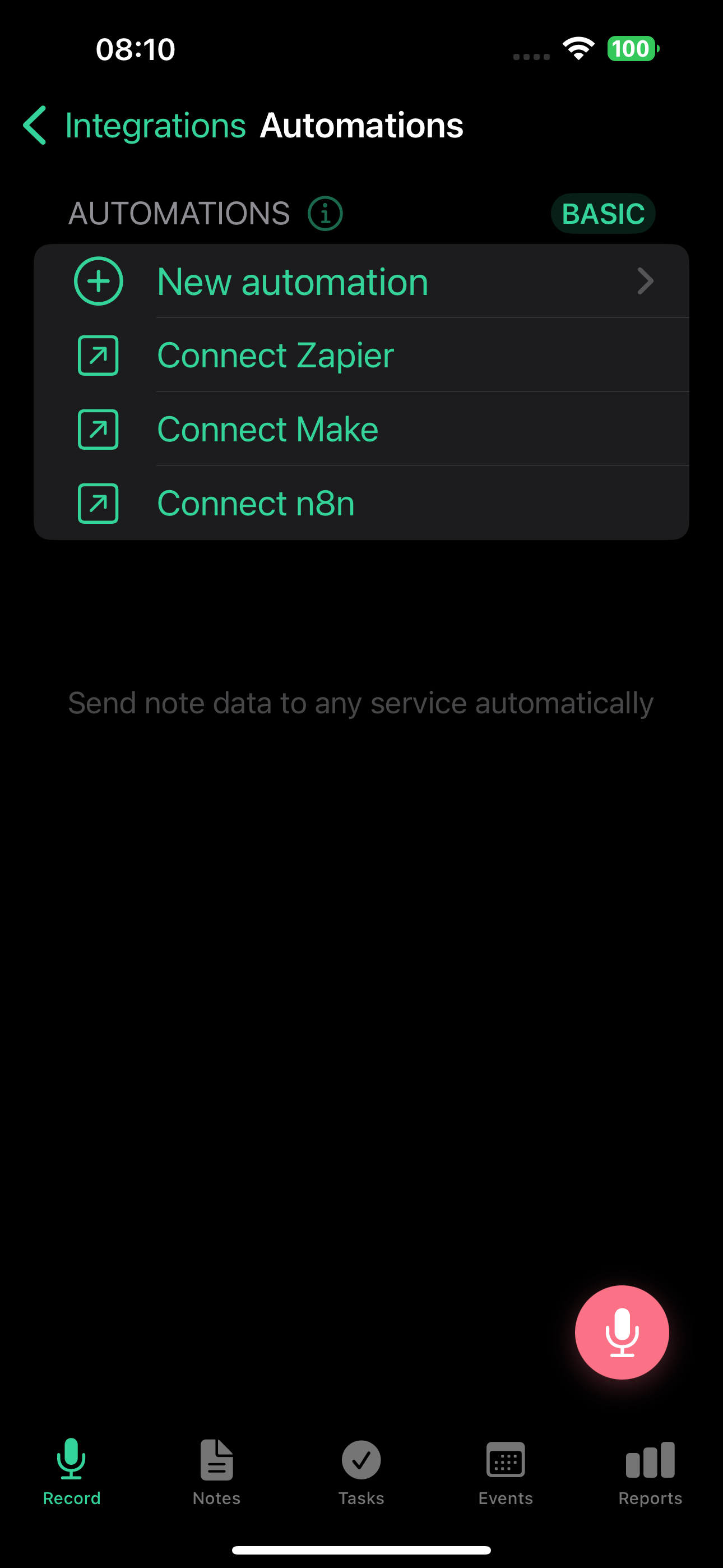
- Go to Settings > Integrations > Webhook Automations
- Tap New Automation
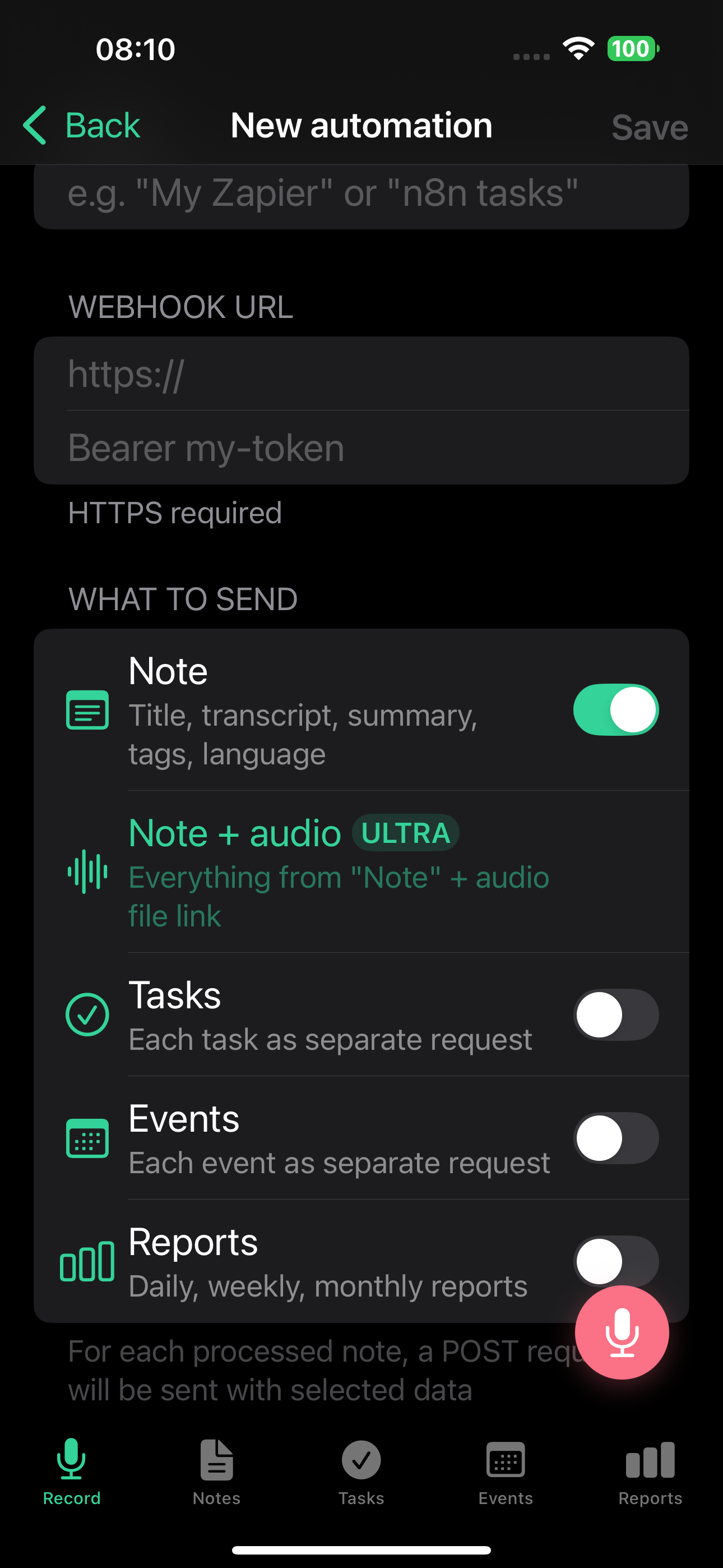
- Enter a name (e.g., "My Zapier webhook")
- Paste the webhook URL from your automation service
- Choose which data to send: notes, tasks, events, reports (or any combination)
- Optionally, add an auth header - a token sent as the
Authorizationheader for secure endpoints - Tap Save
- Copy the signing secret - it is shown in full only when you first create the automation or after you rotate it. You will need it if you want to verify webhook authenticity
- Tap "Test" to send a sample payload to your endpoint without creating a real event
The webhook URL must use HTTPS. HTTP addresses and private network IPs are not accepted.
What gets sent
Every delivery is a JSON object with three fields: event (the event type), timestamp, and data (the actual content). Here is what each event type looks like.
Notes (note.created)
Contains the AI-generated title, full transcript, summary, note type, tags, priority, language, and creation date.
{
  "event": "note.created",
  "timestamp": "2026-02-27T14:38:00Z",
  "data": {
    "note_id": "550e8400-e29b-41d4-a716-446655440000",
    "title": "Meeting notes - Project Alpha",
    "transcript": "Full transcript text...",
    "summary": "Brief AI-generated summary...",
    "type": "meeting",
    "tags": ["work", "project-alpha"],
    "priority": "high",
    "language": "en",
    "created_at": "2026-02-27T10:00:00Z"
  }
}
On the Ultra plan, note deliveries can also include a link to the audio recording (audio_url, audio_format, duration_seconds). The link expires after 24 hours. Enable this with the "Note + Audio" option when creating the automation.
Tasks (task.created)
One delivery per task. A single note with 3 tasks sends 3 separate webhooks.
{
  "event": "task.created",
  "timestamp": "2026-02-27T14:38:01Z",
  "data": {
    "note_id": "550e8400-...",
    "note_title": "Meeting notes - Project Alpha",
    "task_id": "660f9511-...",
    "title": "Send proposal to client",
    "description": "Include pricing for Q2",
    "priority": "high",
    "due_date": "2026-03-01",
    "reminder_at": "2026-02-28T09:00:00Z",
    "tags": ["work"],
    "status": "todo",
    "created_at": "2026-02-27T10:00:00Z"
  }
}
Events (calendar_event.created)
One delivery per calendar event.
{
  "event": "calendar_event.created",
  "timestamp": "2026-02-27T14:38:02Z",
  "data": {
    "note_id": "550e8400-...",
    "note_title": "Meeting notes",
    "event_id": "770a0622-...",
    "title": "Team standup",
    "description": "Weekly sync",
    "start": "2026-03-03T10:00:00+03:00",
    "end": "2026-03-03T10:30:00+03:00",
    "location": "Zoom",
    "is_all_day": false,
    "attendees": ["alice@example.com"],
    "tags": ["work"],
    "created_at": "2026-02-27T10:00:00Z"
  }
}
Reports (report.created)
Sent when a daily, weekly, monthly, or yearly report is generated.
{
  "event": "report.created",
  "timestamp": "2026-02-28T00:05:00Z",
  "data": {
    "report_id": "880b1733-...",
    "report_type": "daily",
    "period_start": "2026-02-27",
    "period_end": "2026-02-27",
    "content_md": "# Daily Report\n\n...",
    "content_json": {
      "productivity_score": 72,
      "day_type": "productive",
      "tasks_created": 5,
      "tasks_completed": 3
    },
    "created_at": "2026-02-28T00:05:00Z"
  }
}
Security
Every delivery is signed with HMAC-SHA256 using your automation's signing secret. The following headers are included with each delivery:
X-LP-Signature- the HMAC-SHA256 signature (sha256=...)X-LP-Timestamp- Unix timestamp used for signingX-LP-Event- the event type (note.created,task.created,calendar_event.created,report.created)X-LP-Delivery-Id- unique delivery ID (useful for deduplication)User-Agent- alwaysTellDone-Webhooks/1.0
The signature headers are sent with every delivery, regardless of other settings.
By default, every delivery includes your automation's signing secret in the Authorization header - so tools like n8n Header Auth work out of the box by pasting the secret as the auth value. If you set a custom auth header in the settings, it replaces this default. You can use two formats: Header-Name: value (sends the named header) or a plain value (sends it as Authorization: <value>).
Each automation has its own signing secret, so rotating one does not affect any of your other webhooks. The secret is shown in full only when you first create the automation or after you rotate it. At all other times, only a preview (whsec_...last4) is shown. To swap it for a new one, tap "Rotate secret" in the automation settings - this generates a new HMAC key without changing the URL or the auth header. The old secret stops working immediately.
Only HTTPS URLs are accepted. HTTP, IP addresses, and private network addresses are rejected.
Verifying webhook signatures
Every delivery includes a signature header in the form X-LP-Signature: sha256=<hex>. The example below shows how to verify it in Python.
Every webhook is signed so you can confirm it actually came from TellDone. The signature is computed as:
HMAC-SHA256(signing_secret, timestamp + "." + raw_body)
The result is hex-encoded and prefixed with sha256= in the signature header.
TellDone serializes JSON with spaces after separators (e.g. {"event": "note.created"}). If you parse and re-serialize the body, the signature won't match. Always verify against the raw bytes of the request body.
Python
import hmac
import hashlib

def verify_signature(raw_body: bytes, signature: str, timestamp: str, secret: str) -> bool:
    payload = f"{timestamp}.".encode() + raw_body
    expected = "sha256=" + hmac.new(
        secret.encode(), payload, hashlib.sha256
    ).hexdigest()
    return hmac.compare_digest(signature, expected)

# Flask example
@app.route("/webhook/telldone", methods=["POST"])
def telldone_webhook():
    raw_body = request.get_data()  # raw bytes, NOT request.json
    signature = request.headers.get("X-LP-Signature", "")
    timestamp = request.headers.get("X-LP-Timestamp", "")

    if not verify_signature(raw_body, signature, timestamp, SIGNING_SECRET):
        abort(403)

    data = request.json
    # process webhook...
Node.js
const crypto = require("crypto");

function verifySignature(rawBody, signature, timestamp, secret) {
  const payload = `${timestamp}.${rawBody}`;
  const expected =
    "sha256=" +
    crypto.createHmac("sha256", secret).update(payload).digest("hex");
  return crypto.timingSafeEqual(
    Buffer.from(signature),
    Buffer.from(expected)
  );
}

// Express example (use express.raw to get the raw body)
app.post("/webhook/telldone", express.raw({ type: "application/json" }), (req, res) => {
  const rawBody = req.body.toString();
  const signature = req.headers["x-lp-signature"] || "";
  const timestamp = req.headers["x-lp-timestamp"] || "";

  if (!verifySignature(rawBody, signature, timestamp, SIGNING_SECRET)) {
    return res.status(403).send("Invalid signature");
  }

  const data = JSON.parse(rawBody);
  // process webhook...
});
Replay protection (optional)
To prevent replay attacks, check that the timestamp is recent:
import time

def verify_timestamp(timestamp: str, tolerance_seconds: int = 300) -> bool:
    try:
        return abs(time.time() - int(timestamp)) < tolerance_seconds
    except (ValueError, TypeError):
        return False
Common mistakes
| Mistake | Fix |
|---|---|
| Using parsed + re-serialized body | Use the raw request body |
JSON.stringify() in JS (compact, no spaces) | Use raw body or match Python spacing |
| Forgetting the timestamp prefix | Payload format is timestamp + "." + body |
| Comparing strings directly | Use hmac.compare_digest or timingSafeEqual |
Retry policy
If your endpoint fails, TellDone retries each delivery with exponential backoff (a few minutes, then longer intervals):
| Attempt | Delay |
|---|---|
| 1st retry | 30 seconds |
| 2nd retry | 2 minutes |
| 3rd retry | 15 minutes |
| 4th retry | 1 hour |
| 5th retry | 4 hours |
After 5 failed attempts, the delivery is marked as dead. You can still retry it manually from the Delivery log.
How TellDone handles different responses:
- 2xx - delivered successfully
- 4xx (except 429) - marked dead immediately, no retry (your endpoint explicitly rejected the data)
- 429 (Too Many Requests) - retries, respects the
Retry-Afterheader - 5xx or timeout - retries with the schedule above
When deliveries fail repeatedly
You don't have to keep an eye on the Delivery log to know when something is broken. TellDone watches consecutive failures for you and reaches out in two stages.
After 3 failures: Inbox warning
After 3 consecutive failed deliveries, TellDone creates a message in your Inbox under the "Webhook failures" category. The message names the affected automation and links you straight to Settings > Integrations > Automations > [the failed automation] > Delivery log so you can inspect the response and decide what to do.
Inbox alerts mean you find out about broken automations from the app icon badge instead of discovering them weeks later from missing data in your downstream tool.
After 20 failures: Auto-disable
If 20 consecutive deliveries for the same automation fail (counted after the Inbox warning), TellDone automatically turns the automation off to stop pinging a broken endpoint and to protect your monthly delivery quota. Fix the issue at the destination, then re-enable the automation from Settings > Integrations > Automations.
The consecutive-failure counter resets to zero on the next successful delivery.
Managing webhooks
- Pause/resume - disable any automation without deleting it, re-enable any time
- Delivery log - view all deliveries with status, HTTP code, and response time. Filter by Delivered or Errors. Tap any failed delivery and choose "Retry" to resend it without waiting for the next scheduled retry
- Test - tap "Test" to send a sample payload (with
"test": truein the body) to your endpoint without creating a real event. Test sends are not counted toward your monthly quota - Rotate secret - generate a fresh HMAC signing secret without changing the URL or auth header
- Edit - update URL, auth header, or payload toggles (notes / audio / tasks / events / reports). Changes take effect immediately
- Delete - permanently removes the automation and all its delivery logs
Delivery limits
Webhook delivery has two caps: a monthly quota (hard cap, varies by plan) and an hourly anti-burst cap (soft cap, identical across paid plans).
| Plan | Webhooks | Monthly deliveries | Hourly burst |
|---|---|---|---|
| Free | 0 | 0 | - |
| Basic | 1 | 300 | 100 |
| Pro | 3 | 3,000 | 100 |
| Ultra | 10 | 15,000 | 100 |
The Ultra plan also supports audio links in note payloads (24-hour expiry).
How the caps behave:
- Monthly cap exceeded - the delivery is marked failed with no retry. New deliveries resume on the 1st of the next month when the counter resets.
- Hourly burst cap exceeded - the delivery is deferred and retried after about 5 minutes, so a short burst won't lose data. This is a soft anti-burst guard, not a permanent reject.
Test sends and manual re-deliveries from the Delivery log do not count toward either cap.
Filtering test events
When you tap "Test", the payload includes "test": true at the top level. In your automation tool, you can check for this field and skip processing when it is present.
Platform guides
For step-by-step setup instructions with your automation tool:
- Zapier - connect TellDone to thousands of apps with Zaps
- Make - build visual automation scenarios (formerly Integromat)
- n8n - use TellDone webhooks in self-hosted or cloud workflows
- Custom endpoints - any service that accepts HTTPS POST requests works with TellDone webhooks
Popular use cases
- Send tasks to a Google Sheet via Zapier
- Create Slack messages from notes via Make
- Log events to a custom CRM via n8n
- Back up all notes to cloud storage
- Forward reports to a team dashboard
See also
- Inbox and support - if a webhook fails repeatedly, you'll see a message in your Inbox
- Zapier - step-by-step Zapier setup
- Make - step-by-step Make setup
- n8n - step-by-step n8n setup
- Todoist - dedicated two-way task sync (no webhooks needed)
- Notion - dedicated Notion integration
- Email forwarding - receive note data via email